Introduction
Overview
Teaching: 0 min
Exercises: 0 minQuestions
What is FAIR software?
Why FAIR software?
How do I make software FAIR?
Objectives
Know what FAIR software is
Understand the benefits of making software FAIR
Describe five recommendations for FAIR software
Know the FAIR software website
What is FAIR?
FAIR stands for Findable, Accessible, Interoperable and Reusable. The FAIR principles are originated in data management and have served as a flagship for promoting good data management practices. However, only recently, the principles have been applied to software.
In general, central to the realization of FAIR are FAIR Digital Objects, which may represent data, software or other research resources.
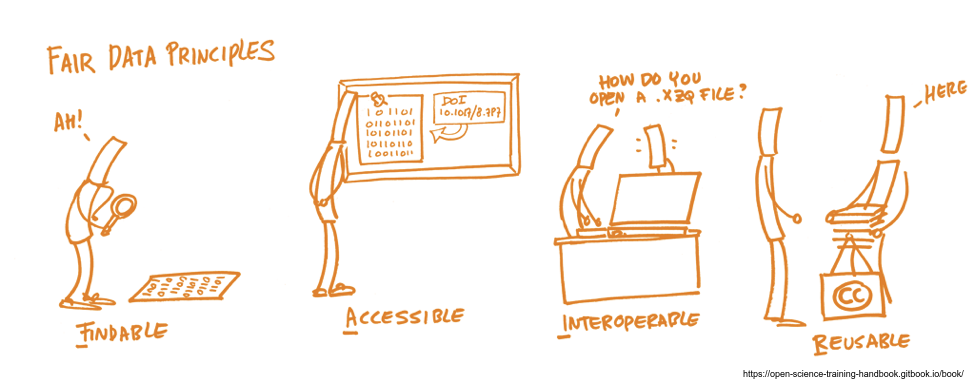
Five recommendations for FAIR software
This lesson introduces the five recommendations on how to make research software more FAIR. The five recommendations presented on the fair-software.eu website are:
- Use a publicly accessible repository with version control.
- Add a license.
- Register your code in a community registry.
- Enable citation of the software.
- Use a software quality checklist.
Key Points
The five recommendations make your code more Findable, Accessible, Interoperable and Reusable.
Use a publicly accessible repository with version control
Overview
Teaching: 0 min
Exercises: 0 minQuestions
What is version control?
Why would I use version control?
Why would I use a publicly accessible repository?
Objectives
Understand the benefits of version control
Understand the benefits of making your code public
Familiarize with GitHub
Learn how to create a GitHub repository
Recommendation 1
Use a publicly accessible repository with version control.
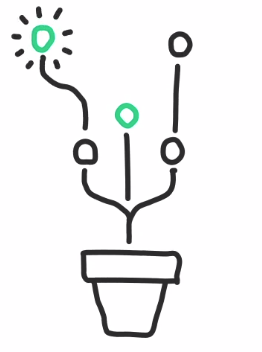
Version control system
Using a version control system allows you to easily track changes in your software, both your own changes as well as those made by collaborators. There are many flavors of version control systems, ranging from older systems such as CVS and Subversion to more modern ones such as Git, Mercurial, and Bazaar. By configuring your version control system to use GitHub, GitLab or Bitbucket, you’ll even have backups of every version of the software you ever made. Additionally, those platforms offer collaboration tools such as an issue tracker and project management tools, and you’ll be able to use third-party services such as code quality checkers, correctness checkers, and a lot more.
Using a version control system or a cloud storage system?
What is the difference between using a version control system, and using a cloud storage system (Google Drive, DropBox, OneDrive, etc)?
Solution
Version control systems are software tools that keep a track of modifications done to the code. They record all the edits and historical versions of the software. Version control systems can take many forms. For instance, they might store objects in cloud storage.
Cloud storage systems are service models in which data is transmitted and stored on remote storage systems and made available to users over the internet. Too often, cloud storage overwrites previous information.
A cloud storage with version control can prevent loss of information.
Public repositories
Developing scientific software in publicly accessible repositories:
- enables early involvement of users,
- helps build collaborations,
- contributes to the reproducibility of results generated by the software,
- facilitates software reusability,
- and contributes to improving software quality.
Taken together, this ensures that your software has the best chance of being used by as many people as possible while promoting transparency.
Consequences of open sourcing your code
What are the consequences of open sourcing your code?
Getting started with git and GitHub
Although there are different version control systems available,
Git is the most feature-rich, modern and popular by a good margin.
The platforms GitHub.com, Bitbucket.org
and GitLab.com all have smooth integrations with Git.
A good starting point to learn about Git is the Software Carpentry git novice lesson.
Making a public repository on GitHub
Create a public repository onder your own GitHub account, and add a readme file to it.
Solution
In your GitHub account page, click on the plus icon + that is next to your profile picture and choose New repository. In this page, you can type a name in the
Repository namebox. ThePublicoption is selected by default. Also, you can check the boxInitialize this repository with a README. This will create aREADME.mdfile in your new repository.
Key Points
Version control systems help to organize and collaborate on code.
Using a public repository contributes to the reproducibility, reusability and quality of your code.
Add a License
Overview
Teaching: 15 min
Exercises: 15 minQuestions
Why is a license important?
When is a license important?
How to choose a license?
How does my license interact with an external library/package and its license
Objectives
Learn about software licenses
Add a license to a GitHub repository
Recommendation 2
Add a license.
*Disclaimer: This topic concerns law and can have serious repercussions. If you have a specific question ask an expert. This text is intended to give a short overview of licensing and is not legal counsel. For the purpose of education content is simplified. Do not solely base your decisions on this text. *
Why a license is important
Any creative work (including software) is automatically protected by copyright. Even when the software is available via code sharing platforms such as GitHub, no one can use it unless they are explicitly granted permission. This is done by adding a software license, which defines the set of rules and conditions for people who want to use the software.
Be aware that you, as the developer of a given piece of software, may not be the copyright holder of the code you write. Often, the copyright holder of the work is the employer (or hiring party) and not the author of the work. If you are not the copyright holder you cannot simply license the code. Inform yourself of your institute’s policy before putting code into the open.
Stack overflow
Suppose you wrote a small code snippet and want to share it with the rest of your research group. While writing the code, you copied a couple of snippets from Stack Overflow. What do you have to do to not get into trouble over copyright infringement?
Solution
Read the Stack Overflow post Code snippets published since 01.02.2016 are published under the MIT license, but you do not have to add the MIT license. A link to the post is enough as attribution.
Choose a license
We ask you to use one of the common licenses. Because these were written by lawyers, the license text is precise in expressing its terms. While that means they may take some more time and effort to understand, the widespread use of the popular licenses means that there is a larger number of people who understand how the letter of the law should be interpreted.
There are several websites that can help you choose a license:
- choosealicense.com: helps to choose an open-source license.
- tldrlegal.com: summarizes what is allowed and not allowed under a given license.
The 3 main rules of choosing a license:
- You have to be the owner of the code or have the owners’ approval. Otherwise, you cannot do it.
- Choose a common license. People know those and understand what they mean. Nobody will spend hours and lawyers on your license to figure out what it means.
- Do not ever modify a license text. A modified license is a new license so more lawyers, time and money.
Permissive and copyleft licenses
Open-source licenses can be broadly separated into two categories: permissive and copyleft. The major difference is that copyleft licenses require that if you share your derived work, then you have to do so under the same license. What counts as a derived work is not defined in copyright law, but some licenses give explicit rules. Certainly if you take a copyleft code and modify it and you want to distribute it in any way you have to open-source it under the same license.
Permissive licenses do not require that. People can more or less do whatever they want with the code, as long they attribute it to you, do not remove any license statements that come with the code, and do not complain when it breaks something.
Copyleft licenses require people to use the same license if they share their derived source code with anyone else. Permissive licenses do not. Copyleft licenses prevent people from taking the code, modifying it, and then sharing the modified version with others under a license that forbids sharing or making changes. That also includes yourself, if you are not the sole copyright holder.
Companies do like permissive licenses more, so if you want commercial contributions to your code, a permissive license might be advantageous. On the other hand, the linux kernel uses a copyleft license and has many commercial contributors.
License compatibility can also impact your choice of license.
License compatibility
Today most software depends on external libraries, modules or packages, which have their own licenses. How do these licenses influence or limit your choice of the license? This is the realm of license compatibility and it is complictated, because it depends on
- how you package your software
- how integrated the library is in your code
- what the specific license of that library requires
- what the dependencies of that library require
Among permissive licenses you will generally not have many problems, but copyleft licenses make things more difficult A nice overview is found in the Turing Way Book.
FOSSA is a tool which for some programming languages helps you to scan and ascertain that all requirements are met.
Often code is shipped together with data, e.g. material constants, examples etc.. . Make sure that you own this data or it has a license which is compatible with your code’s license. For more information have a look at this article
Re-licensing your code
What if you picked the wrong license 5 years ago and now want to change that? If you are the only and single copyright holder of the code, you can change the license for the next version. Old releases of your code will still be available under the old license. If you are not the sole copyright holder you have to get the approval of all copyright holders who made a significant contribution to the code.
Choosing a license for a project at the university
Suppose you write code for a project at the university. Open sourcing software may not yet be a common practice in your community, and there is no clear standard software license to use. What steps will you take?
Solution
Check who actually owns the code and data Check with your employer, what policy they have to open sourcing code and also your funding agency See which license is most common in your field Check briefly your dependencies Think about copyleft vs permissive Agree with copyright holders on a license Add license file to repository
Key Points
It is important to add an open-source license to make your code open.
There are several common licenses that have different permissiveness.
Under the surface it is more complicated, so take the recommended path.
Register your code in a community registry
Overview
Teaching: 0 min
Exercises: 0 minQuestions
What are software registries?
Why should I register my software
Objectives
Understand what a software registry is
Pick a relevant software registry
Understand why you should register your software
Recommendation 3
Register your code in a community registry
Why registering your Software is important
Registering your software makes it easier for others to find it, particularly through the use of search engines such as Google. Community registries typically employ metadata to describe each software package. With metadata, search engines are able to get some idea of what the software is about, what problems it addresses, and what domain it is suited for. In turn, this helps improve the ranking of the software in the search results: better metadata means better ranking.
Community registries are like yellow pages for software
For others to make use of your work, they need to be able to find it first.
How to choose a software registry
Community registries come in many flavors. Choosing a software registry that is best suited for your needs can be tricky. Below we provide a few tips.
-
Think about:
- How much traffic does this community registry get?
- Is this community registry targeting the audience we are trying to reach?
- What metadata does this community registry offer?
- Ask your colleagues which registries they would use to look for software like yours.
- Have a look at the list of research software registries here.
What is metadata and how to find it
‘Metadata is data about data. In other words, it’s information that’s used to describe the data that’s contained in something like a web page, document, or file.’ https://www.lifewire.com/metadata-definition-and-examples-1019177
Metadata is sometimes described in the documentation of the registry. It is also possible to get them by installing a tool like the OpenLink Structured Data Sniffer. Alternatively, some search engines have a tool like the Google Structured Data Testing Tool to provide insight into how they perceive a given website.
Choose a software registry
Have a look at the list of software registries and pick a registry for your software.
- Which registry did you choose?
- Why did you choose that one?
- What kind of software is in this registry?
- Try to find documentation on how to register software in there.
Key Points
Registring your code in a community registry makes your code findable for others.
Enable citation of the software
Overview
Teaching: 0 min
Exercises: 0 minQuestions
Why explicitly enable software citation?
How to make a software citable?
Objectives
Understand why you should enable software citation
Create a citation.cff file
Publish software on Zenodo
Recommendation 4
Enable citation of the software
Why making a software citable is important
Citation helps software developers be recognized for their work. Additionally, a citation is an integral part of scientific accountability and reproducibility.
However, citing software is inherently more difficult than citing a paper. To an outsider especially, even seemingly trivial things such as identifying who should be recognized as an author can be difficult. It is therefore convenient when software developers themselves provide the information necessary to cite.
A citation file
By adding a machine-readable citation file CITATION.cff to your code base,
you can define how the software should be cited.
The CodeMeta metadata schema and the Citation File Format are specifically designed to enable citation. For either one, you write a plain text file with citation metadata, which you then distribute with your software.
Initialize your citation file
We can use the tool cffinit to initialize the
CITATION.cff.
Publish your code in zenodo
Browse to Zenodo and archive a snapshot of your repository created in the lesson Use a publicly accessible repository with version control.
Solution
Follow the instructions on the GitHub guides page.
A persistent identifier
Software is continuously evolving, and ideally when someone uses your software, they cite the exact version of the software they use. To facilitate that, you can make a persistent identifier (Digital Object Identifier or DOI, Uniform Resource Name or URN, Archival Resource Key or ARK, etc) for a snapshot of your software, so that the identifier will continue to resolve to exactly that version in the future.
Archiving services
There are several archiving services that help you create such an identifier, either semi-automatically, or in a fully automated manner, for example, each time you make a new release of your software:
Adding a DOI to your repository
Browse to your repository created in the lesson Use a publicly accessible repository with version control. Add the DOI generated in the previous exercise (Publish your code in zenodo) to the
README.mdfile in your repository.Solution
Follow the instructions on the GitHub guides page.
Key Points
We can publish software without publishing research results.
Use a software quality checklist
Overview
Teaching: 0 min
Exercises: 0 minQuestions
What is a software checklist?
Why is a software checklist important?
What is a Software Management plan?
What is a Software Sustainability plan?
Objectives
Understand what a software checklist is
Understand why it is good to adhere to a software checklist
Choose a relevant software checklist
Recommendation 5
Use a software quality checklist
Why software checklists are important
Checklists help you write good quality software. What exactly good quality means depends on the specific application of the software, but typically covers things like documenting the source code, using continuous testing, and following standardized code patterns.
Using a checklist
There are many checklists available. We find that the most useful checklist are those that:
- allow for a granular evaluation of a software package, as opposed to just pass or fail.
- explain the rationale behind each item in the checklist.
- explain how to get started with implementing each item in the checklist.
We recommend that you include the checklist as part of the README, for example as
a badge or by including the checklist as a
MarkDown table.
The point is decidedly not to show perfect compliance, but rather to be transparent about
the state of the code while providing the necessary guidance on which aspects could be improved.
Here is a list of some candidate checklists:
- Core Infrastructures Initiative (online, interactive).
- Deutsches Zentrum für Luft- und Raumfahrt Class 1, Class 2, Class 3 (MarkDown).
- Software Sustainability Institute’s software evaluation checklist (Google form).
- CLARIAH checklist (PDF page 38-42).
- EURISE (MarkDown).
Choose a checklist
Have a look at the checklists above and pick two checklists.
- What are the differences?
- What do you think about the questions on the checklist?
- Which checklist seems most relevant for your code?
The limits of a checklist
Are all software that ticked all the boxes of a software checklist high quality software?
Key Points
Checklists help you write good quality software.